> ## Documentation Index
> Fetch the complete documentation index at: https://mentionscout.com/docs/llms.txt
> Use this file to discover all available pages before exploring further.
# Citations
> The URLs AI answers actually point to when responding to your prompts.
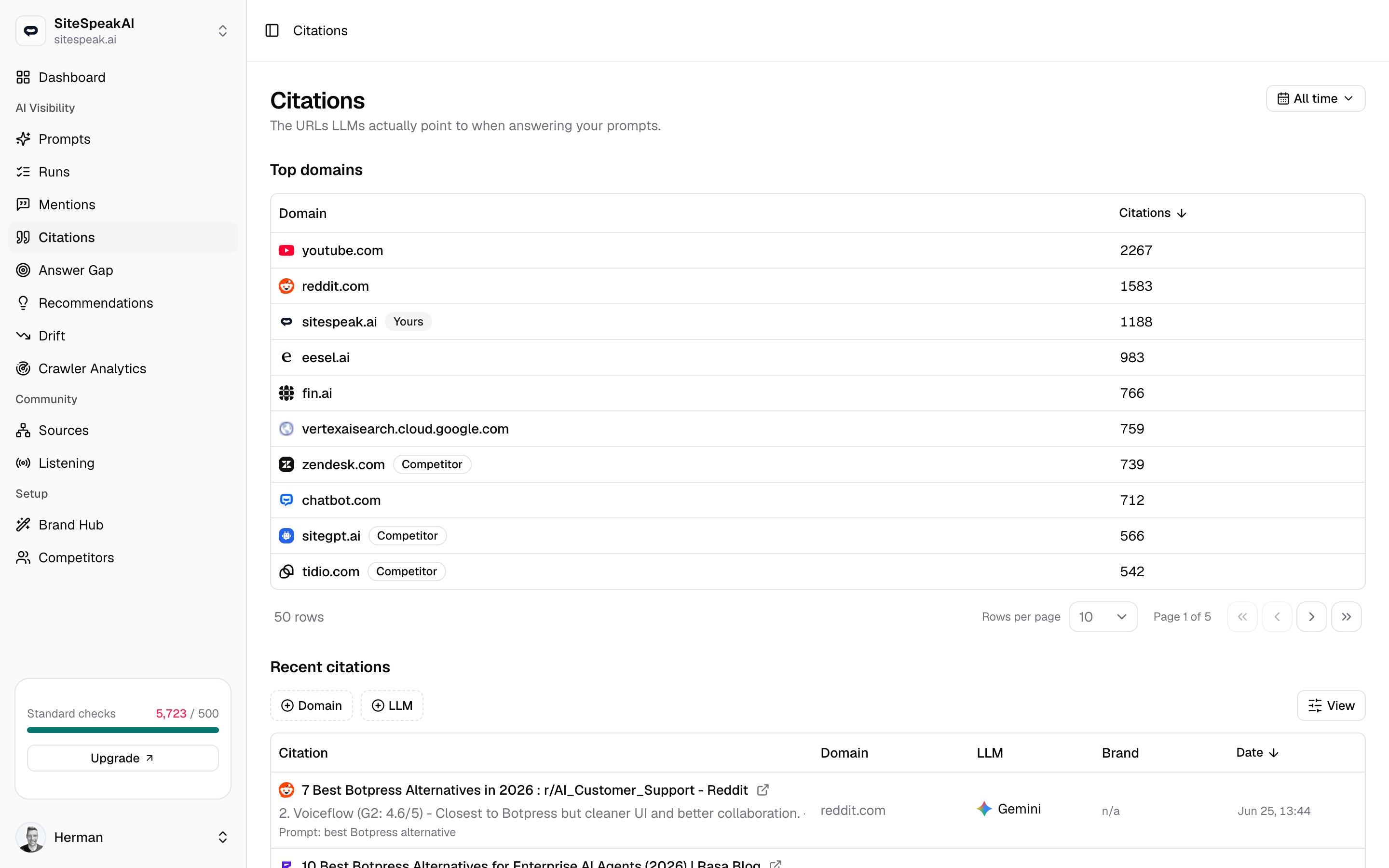
When an AI answer engine responds to one of your prompts, it often links to the pages it drew from. The **Citations** page collects every one of those linked URLs, so you can see which domains AI answers credit as sources, and how often your own domain is among them.
 ## Citation vs mention
These two measure different things, and the difference matters.
* A **citation** is a URL an AI answer *links to as a source*. It is about being credited.
* A **mention** is your brand, a competitor, or your domain being *named in the text* of an answer. It is about being talked about.
An answer can cite you without naming you, name you without citing you, or both at once. Track being credited here, and track being named on the Mentions page.
See every time an AI answer named your brand, a competitor, or your domain.
## Why owning more cited URLs matters
Citations are the raw material AI answers are built from. When an engine credits a page, it is telling you which sources shaped its reply, and a page you own is a source you control.
The more of those cited URLs belong to your domain, the more influence you have over what AI answers say about your space, and the more chances a reader has to click through to you. Use the **Top domains** table to see who currently owns the sources in your category, then work to earn citations on the pages where a competitor's domain shows up but yours does not.
## Top domains
The **Top domains** table rolls up every cited URL by domain, so you can see at a glance which sites AI answers lean on most.
The cited domain, shown with its favicon. A **Yours** badge marks your own tracked domain, and a **Competitor** badge marks a domain you track as a competitor, so your sites and rivals stand out in the list.
How many times that domain was cited across the selected time range. Click the column header to sort. The table opens sorted by citation count, highest first.
Scan for domains with a **Competitor** badge and a high count but no **Yours** badge nearby. Those are the sources AI answers trust in your space that you have not yet earned a place in.
## Recent citations
Below the rollup, the **Recent citations** feed lists individual cited URLs, newest first, so you can read exactly what each answer pointed to.
The cited page's title, or its URL when no title is available, shown with the domain favicon. Click the title to open the run the citation came from and read the full answer in context. Click the external-link icon to open the cited page itself in a new tab. A short snippet of the page appears underneath, and the tracked prompt that produced the answer shows as `Prompt: ...`.
The domain of the cited URL.
The AI answer engine that cited the page, such as ChatGPT, Claude, Gemini, Perplexity, Grok, AI Overviews, or AI Mode, shown with its logo.
Whose page it is. A **Your domain** badge marks a citation to your own site, a competitor's name marks a citation to a tracked rival, and a muted `n/a` marks any other domain.
When the citation was collected, down to the minute. Click the column header to sort. The feed opens sorted by date, newest first.
## Filter and sort
The toolbar above the **Recent citations** feed lets you narrow it to what you care about.
Open the **Domain** filter and pick one or more domains to keep only citations pointing to those sites.
Open the **LLM** filter to focus on a single answer engine, or any combination of them.
Click the **Citations** header on the rollup or the **Date** header on the feed to reorder either table.
Click **Reset** to clear active filters, or use the view options control to show and hide columns.
## Change the time range
The date dropdown at the top right controls both tables at once. Use it to switch between **All time**, **Last 7 days**, **Last 30 days**, and **Last 90 days**. Narrowing the range is the quickest way to see whether a recent push earned you new citations.
Citations are collected from completed runs. If a table is empty, run one of your tracked prompts first, then come back once the runs finish.
## Related
Track where AI answers name you, not just where they link to you.
See the wider web of pages that feed what AI answers say about you.
How prompts, runs, mentions, and citations fit together.
## Citation vs mention
These two measure different things, and the difference matters.
* A **citation** is a URL an AI answer *links to as a source*. It is about being credited.
* A **mention** is your brand, a competitor, or your domain being *named in the text* of an answer. It is about being talked about.
An answer can cite you without naming you, name you without citing you, or both at once. Track being credited here, and track being named on the Mentions page.
See every time an AI answer named your brand, a competitor, or your domain.
## Why owning more cited URLs matters
Citations are the raw material AI answers are built from. When an engine credits a page, it is telling you which sources shaped its reply, and a page you own is a source you control.
The more of those cited URLs belong to your domain, the more influence you have over what AI answers say about your space, and the more chances a reader has to click through to you. Use the **Top domains** table to see who currently owns the sources in your category, then work to earn citations on the pages where a competitor's domain shows up but yours does not.
## Top domains
The **Top domains** table rolls up every cited URL by domain, so you can see at a glance which sites AI answers lean on most.
The cited domain, shown with its favicon. A **Yours** badge marks your own tracked domain, and a **Competitor** badge marks a domain you track as a competitor, so your sites and rivals stand out in the list.
How many times that domain was cited across the selected time range. Click the column header to sort. The table opens sorted by citation count, highest first.
Scan for domains with a **Competitor** badge and a high count but no **Yours** badge nearby. Those are the sources AI answers trust in your space that you have not yet earned a place in.
## Recent citations
Below the rollup, the **Recent citations** feed lists individual cited URLs, newest first, so you can read exactly what each answer pointed to.
The cited page's title, or its URL when no title is available, shown with the domain favicon. Click the title to open the run the citation came from and read the full answer in context. Click the external-link icon to open the cited page itself in a new tab. A short snippet of the page appears underneath, and the tracked prompt that produced the answer shows as `Prompt: ...`.
The domain of the cited URL.
The AI answer engine that cited the page, such as ChatGPT, Claude, Gemini, Perplexity, Grok, AI Overviews, or AI Mode, shown with its logo.
Whose page it is. A **Your domain** badge marks a citation to your own site, a competitor's name marks a citation to a tracked rival, and a muted `n/a` marks any other domain.
When the citation was collected, down to the minute. Click the column header to sort. The feed opens sorted by date, newest first.
## Filter and sort
The toolbar above the **Recent citations** feed lets you narrow it to what you care about.
Open the **Domain** filter and pick one or more domains to keep only citations pointing to those sites.
Open the **LLM** filter to focus on a single answer engine, or any combination of them.
Click the **Citations** header on the rollup or the **Date** header on the feed to reorder either table.
Click **Reset** to clear active filters, or use the view options control to show and hide columns.
## Change the time range
The date dropdown at the top right controls both tables at once. Use it to switch between **All time**, **Last 7 days**, **Last 30 days**, and **Last 90 days**. Narrowing the range is the quickest way to see whether a recent push earned you new citations.
Citations are collected from completed runs. If a table is empty, run one of your tracked prompts first, then come back once the runs finish.
## Related
Track where AI answers name you, not just where they link to you.
See the wider web of pages that feed what AI answers say about you.
How prompts, runs, mentions, and citations fit together.