> ## Documentation Index
> Fetch the complete documentation index at: https://mentionscout.com/docs/llms.txt
> Use this file to discover all available pages before exploring further.
# Crawler analytics
> See whether AI reads your site, whether it gets cited, and whether that sends you traffic.
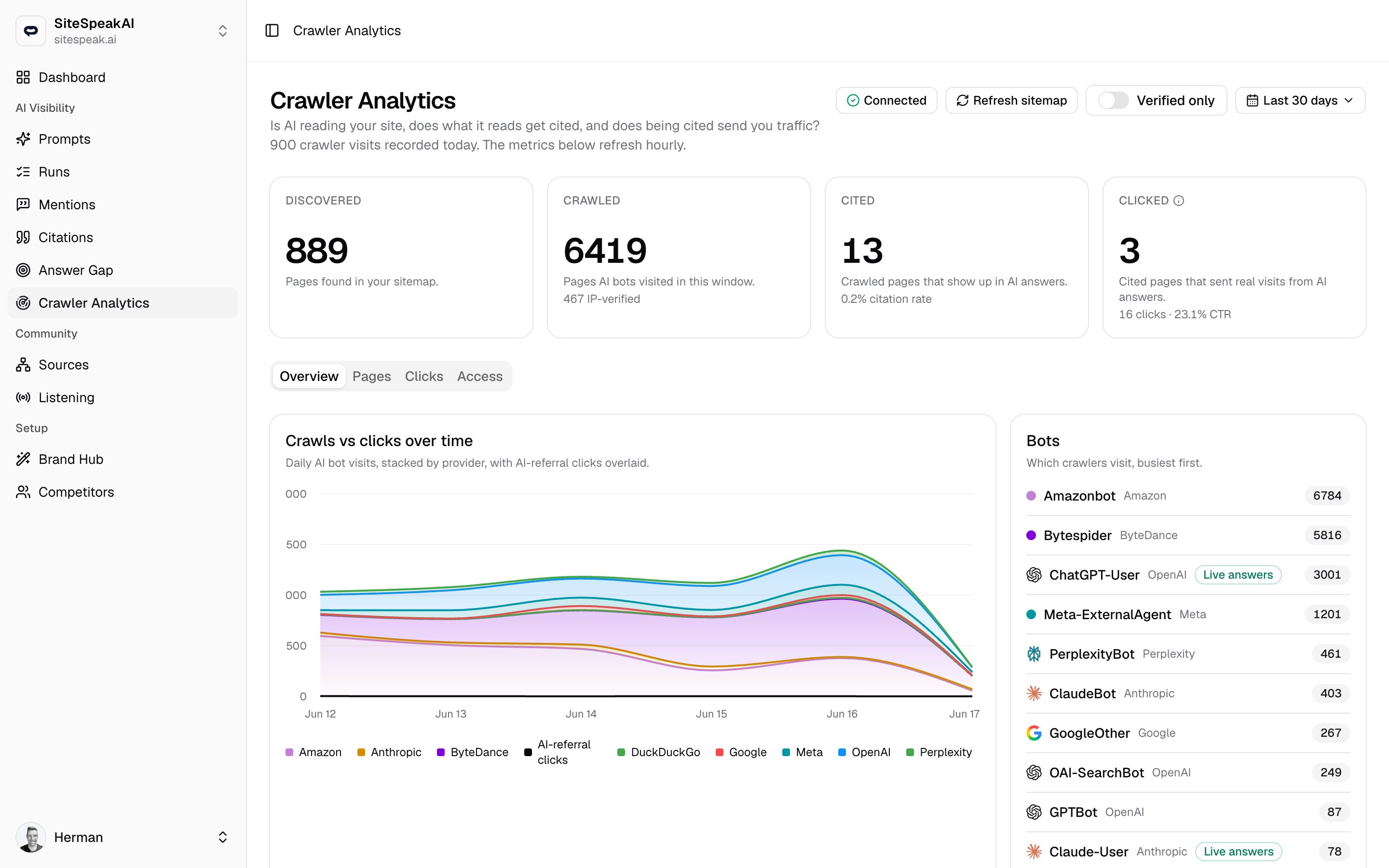
Crawler analytics follows a single page all the way through the AI answer funnel: from sitting in your sitemap, to being read by an AI bot, to being cited in an answer, to sending a real visitor back to you. It answers one question in four numbers: is AI reading your site, does what it reads get cited, and does being cited send you traffic?
 ## The funnel
The four cards across the top are the heart of the page. Each stage feeds the next, so reading them left to right tells you exactly where AI visibility is breaking down.
Pages found in your sitemap. This is the universe of content AI could read.
Pages AI bots actually visited in the selected window. The subtext shows how many of those visits were **IP-verified**, meaning the request came from an IP that belongs to the provider it claimed to be.
Crawled pages that then showed up in AI answers. The subtext shows the share of answer-engine crawls that get cited, for example `40% of answer-engine crawls cited`. Until there is something to measure it instead reads `Needs crawled pages first` (no crawled pages yet) or `No answer-engine crawls yet` (pages crawled, but only by index or training bots that never produce answers).
Cited pages that sent real visits from AI answers, with the total click count and **CTR** underneath.
The number on the **Clicked** card counts cited pages that received an AI-referral click. Your total click volume, including pages outside the cited sample, is the count in the subtext and everything on the **Clicks** tab.
A line below the page heading reports raw activity for the current day, for example how many crawler visits and AI-referral clicks were recorded today. The funnel and the tables below it refresh hourly, so today's raw counts can move ahead of the rolled-up metrics.
## Connecting your site
AI bots do not run JavaScript, so crawler tracking runs at the edge of your domain rather than as a page tag. The button in the top right reflects your connection state:
* **Connect your site** when no tracking is set up yet.
* **Awaiting visits** once tracking is in place but no visit has arrived.
* **Connected** once the first visits are flowing in.
Until a site is connected, the funnel and tables stay empty. Setting this up is a one-time job covered on its own page.
Generate an ingest token, deploy the edge worker on your domain, and confirm visits are arriving.
## Controls
The toolbar above the funnel adjusts what every number on the page reflects.
| Control | What it does |
| ------------------- | ---------------------------------------------------------------------------------------------------------------------------- |
| **Refresh sitemap** | Re-reads your sitemap to pick up new or removed pages, which updates the **Discovered** count. |
| **Verified only** | Restricts every metric to IP-verified visits, so unverifiable bots drop out of the chart, the bot list, and the page tables. |
| **Last N days** | Sets the time window to `7`, `30`, or `90` days. The default is 30. |
Turn on **Verified only** when you want to be sure you are looking at genuine provider traffic. Some bots declare a user agent they cannot prove, and this toggle filters them out.
## Overview tab
The default tab pairs a trend chart with a ranked list of who is visiting.
* **Crawls vs clicks over time** plots daily AI bot visits, stacked by provider, with AI-referral clicks overlaid as a single line. It is the quickest way to see whether crawling and click traffic are rising or falling together.
* **Bots** ranks the crawlers hitting your site, busiest first. Each row shows the bot name (such as `Amazonbot`, `ChatGPT-User`, `PerplexityBot`, `ClaudeBot`, or `GPTBot`) and the provider behind it.
A **Live answers** badge on a bot means it fetched a page live to answer a user, rather than to train or build a search index. That is a strong signal your page is being used in an answer right then.
## Pages tab
This tab is page-level detail on what AI reads and what it does with it.
The main **Pages** table lists every path AI bots visited, most visited first. You can filter it by typing a path into the search box.
| Column | What it shows |
| ---------------- | ------------------------------------------------------------------------------------------------------------------------ |
| **Path** | The page that was crawled. |
| **Visits** | Total AI bot visits to that path in the window. |
| **Verified** | How many of those visits were IP-verified. A green check means every visit to the page came from a verified provider IP. |
| **Last crawled** | When a bot last read the page, or `never`. |
| **Status** | The last HTTP status returned. A `4xx` or `5xx` shows in red. |
Below the table, three more cards turn that data into a to-do list:
Pages AI bots tried to read but got an error, with the status code and how many times it happened. Fix these so the pages can be crawled and cited. This card only appears when there are errors to show.
Pages AI reads but never cites. High-traffic paths here are content that AI sees yet does not credit, which is where on-page improvements can pay off.
Pages AI cites but has not crawled recently, stalest first. If the cited content has changed, AI may be answering from an old version until it crawls again.
## Clicks tab
When an AI answer links to one of your pages and someone follows that link, it counts as an AI-referral click. This tab breaks those clicks down three ways.
* **Top clicked pages** shows which of your pages AI answers send people to. Each path links out to the live page.
* **Top AI referrers** shows which AI assistants send you the most clicks, by referring host and provider.
* **Top click countries** shows where your AI-referral visitors come from.
## Access tab
The **robots.txt audit** checks which AI crawlers your `robots.txt` currently lets in. Each row pairs a crawler and its provider with a verdict:
| Verdict | Meaning |
| ----------- | ----------------------------------------------------------- |
| **Allowed** | The crawler is free to read your site. |
| **Partial** | The crawler is allowed on some paths and blocked on others. |
| **Blocked** | Your `robots.txt` blocks this crawler entirely. |
| **unknown** | No clear rule was found for it. |
Click **Re-check** to fetch and re-audit your `robots.txt`, for example after you change the file.
A **Blocked** verdict on a major AI crawler means that engine cannot read your site at all, which caps everything downstream in the funnel. If you want AI answers to cite you, that crawler needs at least partial access.
## Related
The one-time install that powers this dashboard.
The Cited stage connects here: see exactly which AI answers credit your domain as a source.
## The funnel
The four cards across the top are the heart of the page. Each stage feeds the next, so reading them left to right tells you exactly where AI visibility is breaking down.
Pages found in your sitemap. This is the universe of content AI could read.
Pages AI bots actually visited in the selected window. The subtext shows how many of those visits were **IP-verified**, meaning the request came from an IP that belongs to the provider it claimed to be.
Crawled pages that then showed up in AI answers. The subtext shows the share of answer-engine crawls that get cited, for example `40% of answer-engine crawls cited`. Until there is something to measure it instead reads `Needs crawled pages first` (no crawled pages yet) or `No answer-engine crawls yet` (pages crawled, but only by index or training bots that never produce answers).
Cited pages that sent real visits from AI answers, with the total click count and **CTR** underneath.
The number on the **Clicked** card counts cited pages that received an AI-referral click. Your total click volume, including pages outside the cited sample, is the count in the subtext and everything on the **Clicks** tab.
A line below the page heading reports raw activity for the current day, for example how many crawler visits and AI-referral clicks were recorded today. The funnel and the tables below it refresh hourly, so today's raw counts can move ahead of the rolled-up metrics.
## Connecting your site
AI bots do not run JavaScript, so crawler tracking runs at the edge of your domain rather than as a page tag. The button in the top right reflects your connection state:
* **Connect your site** when no tracking is set up yet.
* **Awaiting visits** once tracking is in place but no visit has arrived.
* **Connected** once the first visits are flowing in.
Until a site is connected, the funnel and tables stay empty. Setting this up is a one-time job covered on its own page.
Generate an ingest token, deploy the edge worker on your domain, and confirm visits are arriving.
## Controls
The toolbar above the funnel adjusts what every number on the page reflects.
| Control | What it does |
| ------------------- | ---------------------------------------------------------------------------------------------------------------------------- |
| **Refresh sitemap** | Re-reads your sitemap to pick up new or removed pages, which updates the **Discovered** count. |
| **Verified only** | Restricts every metric to IP-verified visits, so unverifiable bots drop out of the chart, the bot list, and the page tables. |
| **Last N days** | Sets the time window to `7`, `30`, or `90` days. The default is 30. |
Turn on **Verified only** when you want to be sure you are looking at genuine provider traffic. Some bots declare a user agent they cannot prove, and this toggle filters them out.
## Overview tab
The default tab pairs a trend chart with a ranked list of who is visiting.
* **Crawls vs clicks over time** plots daily AI bot visits, stacked by provider, with AI-referral clicks overlaid as a single line. It is the quickest way to see whether crawling and click traffic are rising or falling together.
* **Bots** ranks the crawlers hitting your site, busiest first. Each row shows the bot name (such as `Amazonbot`, `ChatGPT-User`, `PerplexityBot`, `ClaudeBot`, or `GPTBot`) and the provider behind it.
A **Live answers** badge on a bot means it fetched a page live to answer a user, rather than to train or build a search index. That is a strong signal your page is being used in an answer right then.
## Pages tab
This tab is page-level detail on what AI reads and what it does with it.
The main **Pages** table lists every path AI bots visited, most visited first. You can filter it by typing a path into the search box.
| Column | What it shows |
| ---------------- | ------------------------------------------------------------------------------------------------------------------------ |
| **Path** | The page that was crawled. |
| **Visits** | Total AI bot visits to that path in the window. |
| **Verified** | How many of those visits were IP-verified. A green check means every visit to the page came from a verified provider IP. |
| **Last crawled** | When a bot last read the page, or `never`. |
| **Status** | The last HTTP status returned. A `4xx` or `5xx` shows in red. |
Below the table, three more cards turn that data into a to-do list:
Pages AI bots tried to read but got an error, with the status code and how many times it happened. Fix these so the pages can be crawled and cited. This card only appears when there are errors to show.
Pages AI reads but never cites. High-traffic paths here are content that AI sees yet does not credit, which is where on-page improvements can pay off.
Pages AI cites but has not crawled recently, stalest first. If the cited content has changed, AI may be answering from an old version until it crawls again.
## Clicks tab
When an AI answer links to one of your pages and someone follows that link, it counts as an AI-referral click. This tab breaks those clicks down three ways.
* **Top clicked pages** shows which of your pages AI answers send people to. Each path links out to the live page.
* **Top AI referrers** shows which AI assistants send you the most clicks, by referring host and provider.
* **Top click countries** shows where your AI-referral visitors come from.
## Access tab
The **robots.txt audit** checks which AI crawlers your `robots.txt` currently lets in. Each row pairs a crawler and its provider with a verdict:
| Verdict | Meaning |
| ----------- | ----------------------------------------------------------- |
| **Allowed** | The crawler is free to read your site. |
| **Partial** | The crawler is allowed on some paths and blocked on others. |
| **Blocked** | Your `robots.txt` blocks this crawler entirely. |
| **unknown** | No clear rule was found for it. |
Click **Re-check** to fetch and re-audit your `robots.txt`, for example after you change the file.
A **Blocked** verdict on a major AI crawler means that engine cannot read your site at all, which caps everything downstream in the funnel. If you want AI answers to cite you, that crawler needs at least partial access.
## Related
The one-time install that powers this dashboard.
The Cited stage connects here: see exactly which AI answers credit your domain as a source.