> ## Documentation Index
> Fetch the complete documentation index at: https://mentionscout.com/docs/llms.txt
> Use this file to discover all available pages before exploring further.
# Listening
> Brand and competitor conversations across Reddit, Hacker News, and Bluesky.
Listening is your feed of real conversations where your brand or a competitor comes up across Reddit, Hacker News, and Bluesky. These are the discussions people have on the open web, the same places AI answer engines read and learn from, so watching them is how you spot praise, complaints, and competitive comparisons before they shape what AI says about you.
 ## What you are looking at
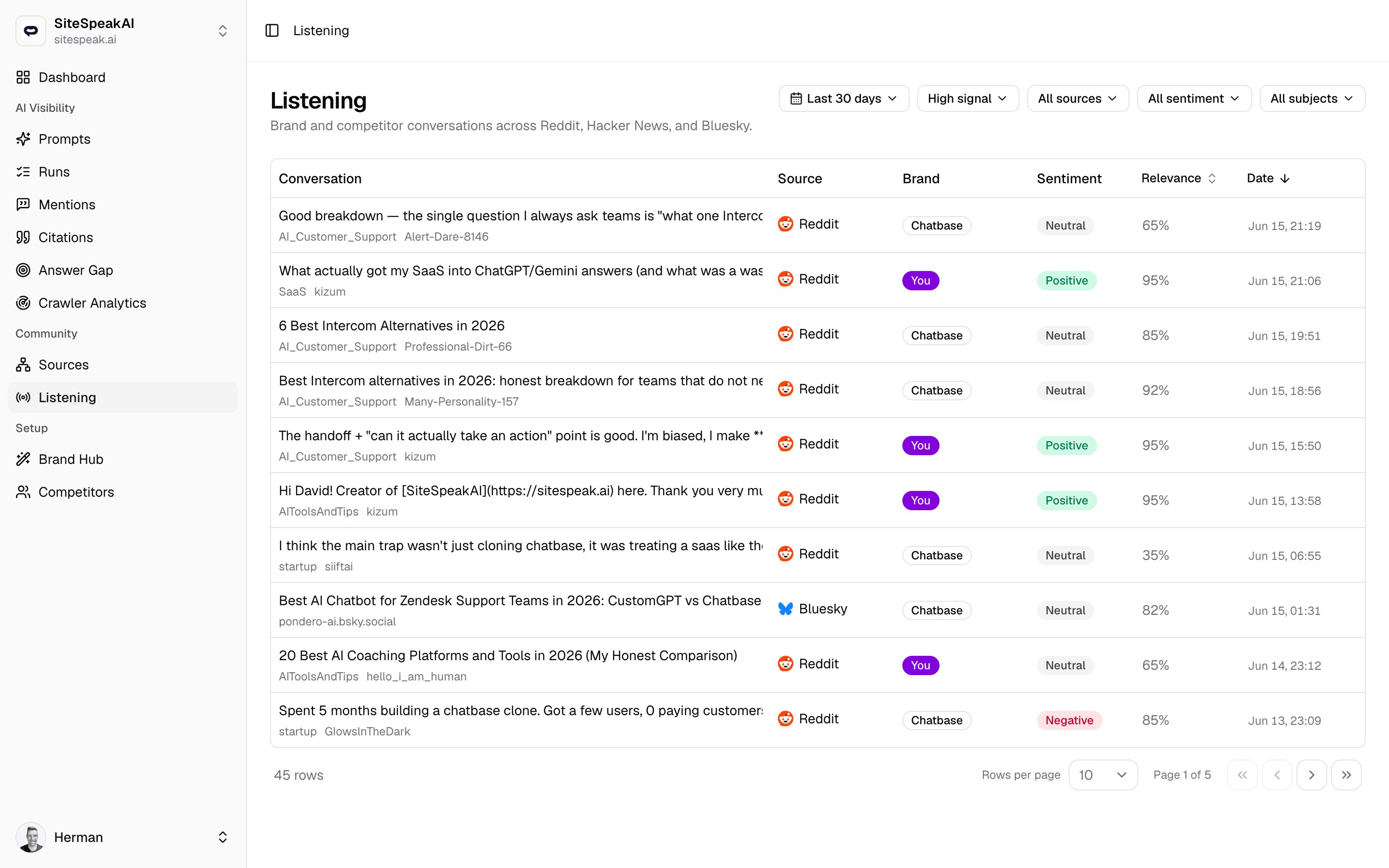
Each row is a single conversation, like a Reddit post, a Hacker News thread, or a Bluesky post, where your brand name or one of your tracked keywords showed up. The feed loads your most recent matches newest first, so the freshest discussion always sits at the top.
The page only fills in once you have a website selected. If you see **Select a website to see its conversations**, switch to a website first.
## What each column shows
The title or text of the post, which links straight to the original thread when a link is available. Underneath you may see the channel it appeared in (such as a subreddit) and the author. A **Cited by AI** badge here means this same conversation was later linked as a source inside an AI answer.
Where the conversation happened: **Reddit**, **Hacker News**, or **Bluesky**, each shown with its logo.
Who the conversation is about. A **You** badge means it mentions your brand, and a named badge means it mentions that competitor.
How the mention reads in context: `Positive`, `Neutral`, or `Negative`. A muted `n/a` means sentiment was not scored.
A score from `0%` to `100%` for how confidently the match is really about your brand or competitor, rather than a coincidental use of the same word. A muted `n/a` means it has not been scored yet. Click the column header to sort by it.
When the conversation was posted. Click the column header to sort by it. The feed opens sorted by date, newest first.
## Filter the feed
The toolbar above the table narrows the feed to what you care about. Filters combine, so you can stack them to zero in on, for example, negative competitor mentions on Reddit in the last week.
Open the date picker and choose **Last 7 days**, **Last 30 days**, or **Last 90 days**. The feed filters by when the conversation was posted, not when it was found. The default is 30 days.
The feed defaults to **High signal**, which hides low-relevance noise so you only see conversations worth reading. Switch to **All conversations** to include lower-relevance matches.
Open the source picker to limit the feed to **Reddit**, **Hacker News**, or **Bluesky**. Each option shows how many matches it has in the current view.
Open the sentiment picker and choose **Positive**, **Neutral**, or **Negative** to focus on how you are being talked about.
Open the subject picker and choose **You** to see only conversations about your brand, or **Competitors** to see only conversations about your rivals. Each option shows its count.
Negative mentions and competitor comparisons are the highest-value rows here. They tell you where the open web is shaping a story about you that AI answers may pick up next.
Seeing an empty feed under **High signal**? Switch to **All conversations** to include lower-relevance matches, or widen the time range.
## Configure what you monitor
Tune which platforms and terms Listening watches from **Settings** then **Listening**. Your brand name is always monitored; everything here adds to or refines that.
## What you are looking at
Each row is a single conversation, like a Reddit post, a Hacker News thread, or a Bluesky post, where your brand name or one of your tracked keywords showed up. The feed loads your most recent matches newest first, so the freshest discussion always sits at the top.
The page only fills in once you have a website selected. If you see **Select a website to see its conversations**, switch to a website first.
## What each column shows
The title or text of the post, which links straight to the original thread when a link is available. Underneath you may see the channel it appeared in (such as a subreddit) and the author. A **Cited by AI** badge here means this same conversation was later linked as a source inside an AI answer.
Where the conversation happened: **Reddit**, **Hacker News**, or **Bluesky**, each shown with its logo.
Who the conversation is about. A **You** badge means it mentions your brand, and a named badge means it mentions that competitor.
How the mention reads in context: `Positive`, `Neutral`, or `Negative`. A muted `n/a` means sentiment was not scored.
A score from `0%` to `100%` for how confidently the match is really about your brand or competitor, rather than a coincidental use of the same word. A muted `n/a` means it has not been scored yet. Click the column header to sort by it.
When the conversation was posted. Click the column header to sort by it. The feed opens sorted by date, newest first.
## Filter the feed
The toolbar above the table narrows the feed to what you care about. Filters combine, so you can stack them to zero in on, for example, negative competitor mentions on Reddit in the last week.
Open the date picker and choose **Last 7 days**, **Last 30 days**, or **Last 90 days**. The feed filters by when the conversation was posted, not when it was found. The default is 30 days.
The feed defaults to **High signal**, which hides low-relevance noise so you only see conversations worth reading. Switch to **All conversations** to include lower-relevance matches.
Open the source picker to limit the feed to **Reddit**, **Hacker News**, or **Bluesky**. Each option shows how many matches it has in the current view.
Open the sentiment picker and choose **Positive**, **Neutral**, or **Negative** to focus on how you are being talked about.
Open the subject picker and choose **You** to see only conversations about your brand, or **Competitors** to see only conversations about your rivals. Each option shows its count.
Negative mentions and competitor comparisons are the highest-value rows here. They tell you where the open web is shaping a story about you that AI answers may pick up next.
Seeing an empty feed under **High signal**? Switch to **All conversations** to include lower-relevance matches, or widen the time range.
## Configure what you monitor
Tune which platforms and terms Listening watches from **Settings** then **Listening**. Your brand name is always monitored; everything here adds to or refines that.
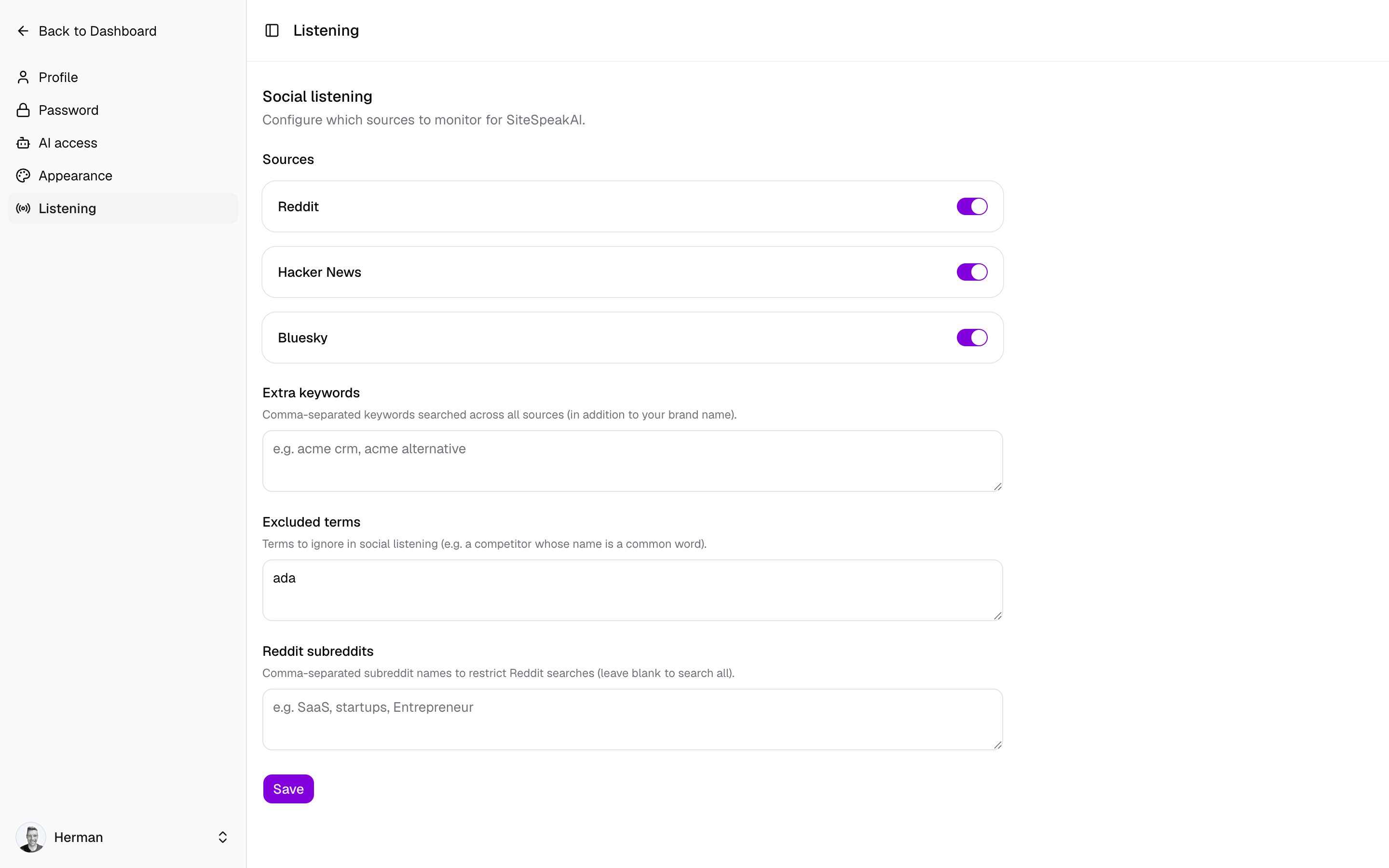 Toggle **Reddit**, **Hacker News**, and **Bluesky** on or off. Turn off any platform you do not want in the feed.
In **Extra keywords**, enter comma-separated terms to track in addition to your brand name, such as a product line or an `acme alternative` style phrase. These are searched across every source you have enabled.
In **Excluded terms**, list comma-separated words to ignore. This is useful when a competitor's name is also a common word that floods the feed with unrelated matches.
In **Reddit subreddits**, enter comma-separated subreddit names to restrict Reddit matches to those communities. Leave it blank to search all of Reddit.
Click **Save** to apply your changes. New settings take effect on the next round of monitoring.
Extra keywords may be capped by your plan. If you hit the limit, you will see a message telling you the maximum your plan allows.
## Related
See which sites AI answer engines actually cite, the other half of your community picture.
Manage the rivals tracked in the Brand column and the subject filter.
How AI Visibility, Community, and Setup fit together.
Toggle **Reddit**, **Hacker News**, and **Bluesky** on or off. Turn off any platform you do not want in the feed.
In **Extra keywords**, enter comma-separated terms to track in addition to your brand name, such as a product line or an `acme alternative` style phrase. These are searched across every source you have enabled.
In **Excluded terms**, list comma-separated words to ignore. This is useful when a competitor's name is also a common word that floods the feed with unrelated matches.
In **Reddit subreddits**, enter comma-separated subreddit names to restrict Reddit matches to those communities. Leave it blank to search all of Reddit.
Click **Save** to apply your changes. New settings take effect on the next round of monitoring.
Extra keywords may be capped by your plan. If you hit the limit, you will see a message telling you the maximum your plan allows.
## Related
See which sites AI answer engines actually cite, the other half of your community picture.
Manage the rivals tracked in the Brand column and the subject filter.
How AI Visibility, Community, and Setup fit together.