> ## Documentation Index
> Fetch the complete documentation index at: https://mentionscout.com/docs/llms.txt
> Use this file to discover all available pages before exploring further.
# Community sources
> Community threads AI answers cite, and whether you show up in them.
AI answers often draw on community threads: question-and-answer posts, forum discussions, and video write-ups across the wider web. The **Community sources** page shows which of those threads AI engines cite when they answer your prompts, and whether you get a mention in them or only your competitors do.
 ## What this page measures
This page is about third-party community content that AI answers credit as sources. It is built from the citations on your completed prompt runs, narrowed to the ones that come from a community platform such as Reddit, Hacker News, Quora, Stack Overflow, or YouTube.
That makes it distinct from two neighbouring pages:
* **Citations** lists *every* URL AI answers link to, across the whole web. Community sources zooms in on the subset that comes from community threads.
* **Listening** watches *live* conversations as they happen on Reddit, Hacker News, and Bluesky. Community sources looks at threads only once an AI answer has already cited them.
Every URL AI answers point to, not just community threads.
Live conversations across Reddit, Hacker News, and Bluesky.
## Coverage
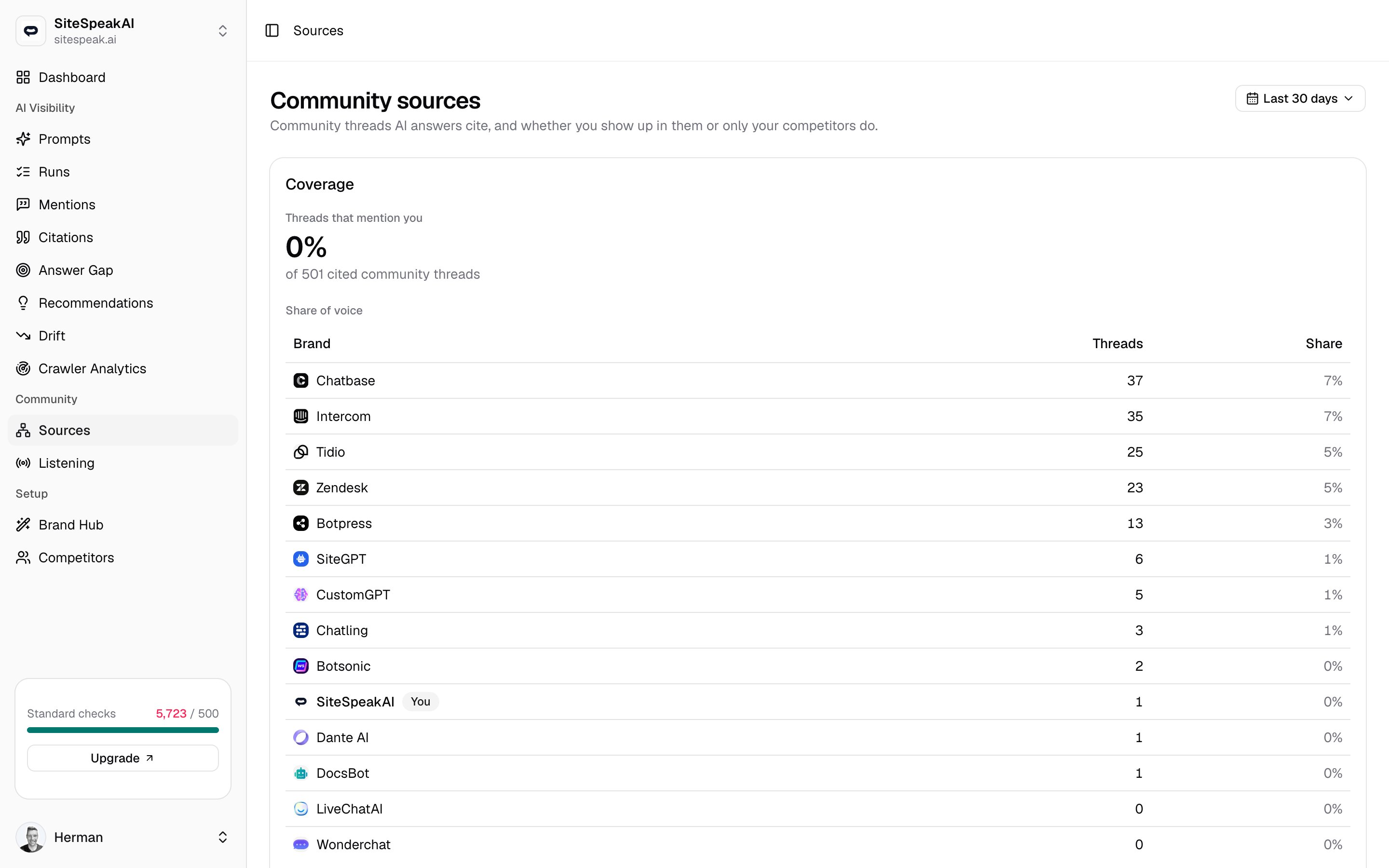
The **Coverage** card answers one question: of all the community threads AI answers cite when responding to your prompts, how many actually mention you?
The headline figure is your **Threads that mention you** percentage, shown above a count like *of 42 cited community threads*. A high number means you are present in the community discussions AI engines lean on. A low number means AI is building answers from threads where you are absent.
Coverage counts each unique thread once, even if several prompt runs cite it. The percentage is the share of cited community threads that name your brand.
### Share of voice
The **Share of voice** table breaks the same threads down by brand, so you can see who owns the conversation.
| Column | What it shows |
| ----------- | ---------------------------------------------------------------------------------------------- |
| **Brand** | Your brand or a tracked competitor, shown with its logo. Your own row carries a **You** badge. |
| **Threads** | How many cited community threads mention that brand. |
| **Share** | That count as a percentage of all cited community threads. |
One thread can mention more than one brand (for example a "X vs Y" comparison), so the shares are not meant to add up to 100%. The table is sorted by thread count, with the most-mentioned brand first.
### Top communities
Below the table, **Top communities** badges show which platforms the cited threads come from, with a count beside each one, such as **Reddit (12)**, **Quora (5)**, or **YouTube (3)**. Use this to see where AI engines are sourcing answers about your space, so you know which communities are worth your attention.
If the card reads *No cited community threads in this range yet*, your completed runs have not cited any community threads in the selected window. Run more prompts, or widen the time range, then check back.
## Source gaps
The **Source gaps** table is the action list. It collects community threads that AI cites and that mention a competitor but *not* you. Each one is a discussion where a rival earned a place in the answer and you did not.
The table lists one row per thread, sorted by citation count so the most influential gaps sit at the top.
The thread's title and a short snippet. Click it to open the original community post in a new tab.
The community the thread comes from, shown with its logo, such as Reddit, Hacker News, Quora, Stack Overflow, or YouTube.
Badges for each tracked competitor the thread mentions.
Which AI engines cited the thread, shown by logo and name, such as ChatGPT, Claude, Gemini, Grok, Perplexity, AI Overviews, and AI Mode.
How many of your prompt runs cited this thread. The table sorts on this column by default; click the header to reverse the order.
Work the gaps from the top down. A thread cited by several engines, mentioning a competitor, is a high-value place to earn your own presence, whether by joining the discussion, answering the question, or publishing the content that thread is missing.
If you see *No source gaps in this range*, AI answers are not citing competitor-only community threads in the selected window. That is a good sign: where AI cites community threads about your space, you are already in them.
## Change the time range
The dropdown at the top right sets the window for the whole page, both the Coverage card and the Source gaps table. Click it to switch between **Last 7 days**, **Last 30 days**, and **Last 90 days**. The default is the last 30 days.
Pick a website first. Until one is selected, the page shows *Select a website to see its community sources*, because coverage and gaps are always scoped to a single brand.
## Related
Track live mentions across Reddit, Hacker News, and Bluesky.
The full set of URLs AI answers cite, across the whole web.
## What this page measures
This page is about third-party community content that AI answers credit as sources. It is built from the citations on your completed prompt runs, narrowed to the ones that come from a community platform such as Reddit, Hacker News, Quora, Stack Overflow, or YouTube.
That makes it distinct from two neighbouring pages:
* **Citations** lists *every* URL AI answers link to, across the whole web. Community sources zooms in on the subset that comes from community threads.
* **Listening** watches *live* conversations as they happen on Reddit, Hacker News, and Bluesky. Community sources looks at threads only once an AI answer has already cited them.
Every URL AI answers point to, not just community threads.
Live conversations across Reddit, Hacker News, and Bluesky.
## Coverage
The **Coverage** card answers one question: of all the community threads AI answers cite when responding to your prompts, how many actually mention you?
The headline figure is your **Threads that mention you** percentage, shown above a count like *of 42 cited community threads*. A high number means you are present in the community discussions AI engines lean on. A low number means AI is building answers from threads where you are absent.
Coverage counts each unique thread once, even if several prompt runs cite it. The percentage is the share of cited community threads that name your brand.
### Share of voice
The **Share of voice** table breaks the same threads down by brand, so you can see who owns the conversation.
| Column | What it shows |
| ----------- | ---------------------------------------------------------------------------------------------- |
| **Brand** | Your brand or a tracked competitor, shown with its logo. Your own row carries a **You** badge. |
| **Threads** | How many cited community threads mention that brand. |
| **Share** | That count as a percentage of all cited community threads. |
One thread can mention more than one brand (for example a "X vs Y" comparison), so the shares are not meant to add up to 100%. The table is sorted by thread count, with the most-mentioned brand first.
### Top communities
Below the table, **Top communities** badges show which platforms the cited threads come from, with a count beside each one, such as **Reddit (12)**, **Quora (5)**, or **YouTube (3)**. Use this to see where AI engines are sourcing answers about your space, so you know which communities are worth your attention.
If the card reads *No cited community threads in this range yet*, your completed runs have not cited any community threads in the selected window. Run more prompts, or widen the time range, then check back.
## Source gaps
The **Source gaps** table is the action list. It collects community threads that AI cites and that mention a competitor but *not* you. Each one is a discussion where a rival earned a place in the answer and you did not.
The table lists one row per thread, sorted by citation count so the most influential gaps sit at the top.
The thread's title and a short snippet. Click it to open the original community post in a new tab.
The community the thread comes from, shown with its logo, such as Reddit, Hacker News, Quora, Stack Overflow, or YouTube.
Badges for each tracked competitor the thread mentions.
Which AI engines cited the thread, shown by logo and name, such as ChatGPT, Claude, Gemini, Grok, Perplexity, AI Overviews, and AI Mode.
How many of your prompt runs cited this thread. The table sorts on this column by default; click the header to reverse the order.
Work the gaps from the top down. A thread cited by several engines, mentioning a competitor, is a high-value place to earn your own presence, whether by joining the discussion, answering the question, or publishing the content that thread is missing.
If you see *No source gaps in this range*, AI answers are not citing competitor-only community threads in the selected window. That is a good sign: where AI cites community threads about your space, you are already in them.
## Change the time range
The dropdown at the top right sets the window for the whole page, both the Coverage card and the Source gaps table. Click it to switch between **Last 7 days**, **Last 30 days**, and **Last 90 days**. The default is the last 30 days.
Pick a website first. Until one is selected, the page shows *Select a website to see its community sources*, because coverage and gaps are always scoped to a single brand.
## Related
Track live mentions across Reddit, Hacker News, and Bluesky.
The full set of URLs AI answers cite, across the whole web.