
On this page
Most of us still carry a Google-shaped mental model of how crawling works. You publish a page, maybe ping a sitemap, and then you wait. Days, sometimes weeks, while the index catches up. I carried that model too, right up until I watched an AI crawler read a brand new page six minutes after I hit publish.
Six minutes. I sat there refreshing the logs thinking something must be misconfigured.
That number changed how I think about publishing, so this post walks through the whole thing: what I did, exactly which crawlers showed up and when, why the speed makes sense once you understand how AI crawlers work, and what you can do to get your own pages read faster.
The experiment
On one of our sites, I published a brand new blog post. No sitemap ping, no manual submission, no links from anywhere else. Just a fresh URL on an established domain, invisible unless something went looking for it.
Then I gave the AI assistants a reason to look. A few minutes after publishing, I asked ChatGPT, Claude and Perplexity a specific question that only the new page answered, with enough context that each assistant would search the web instead of answering from memory.
I want to be upfront about that part, because it matters for reading the results honestly: this measures how fast the machinery can move when an assistant has a reason to fetch a page. Organic discovery with no nudge takes longer. But that was the point. I wanted to know the floor. When someone asks an AI assistant about something you just published, how quickly can it actually read your content?
From there I just watched the crawler traffic arrive.
Six minutes to the first AI crawl
Here is the full first-day timeline, from the moment the page went live:
| Time after publish | Visitor | What it was |
|---|---|---|
| ~6 minutes | ChatGPT-User | OpenAI's on-demand fetcher, reading the page live to answer the question |
| ~7 minutes | Claude-User | Anthropic's on-demand fetcher, doing the same for Claude |
| ~8 minutes | Perplexity-User | Perplexity's on-demand fetcher |
| ~2.5 hours | OAI-SearchBot | OpenAI's search index crawler |
| ~3 hours | PerplexityBot | Perplexity's index crawler |
| ~3.5 hours | Claude-SearchBot | Anthropic's index crawler |
I honestly expected hours for the first fetch, not minutes. And the index crawlers, the ones that power browsable AI search results, all arrived within the same afternoon. No waiting period, no crawl budget queue, no "check back in two weeks". The first human visitor referred from chatgpt.com clicked through a few hours after that.
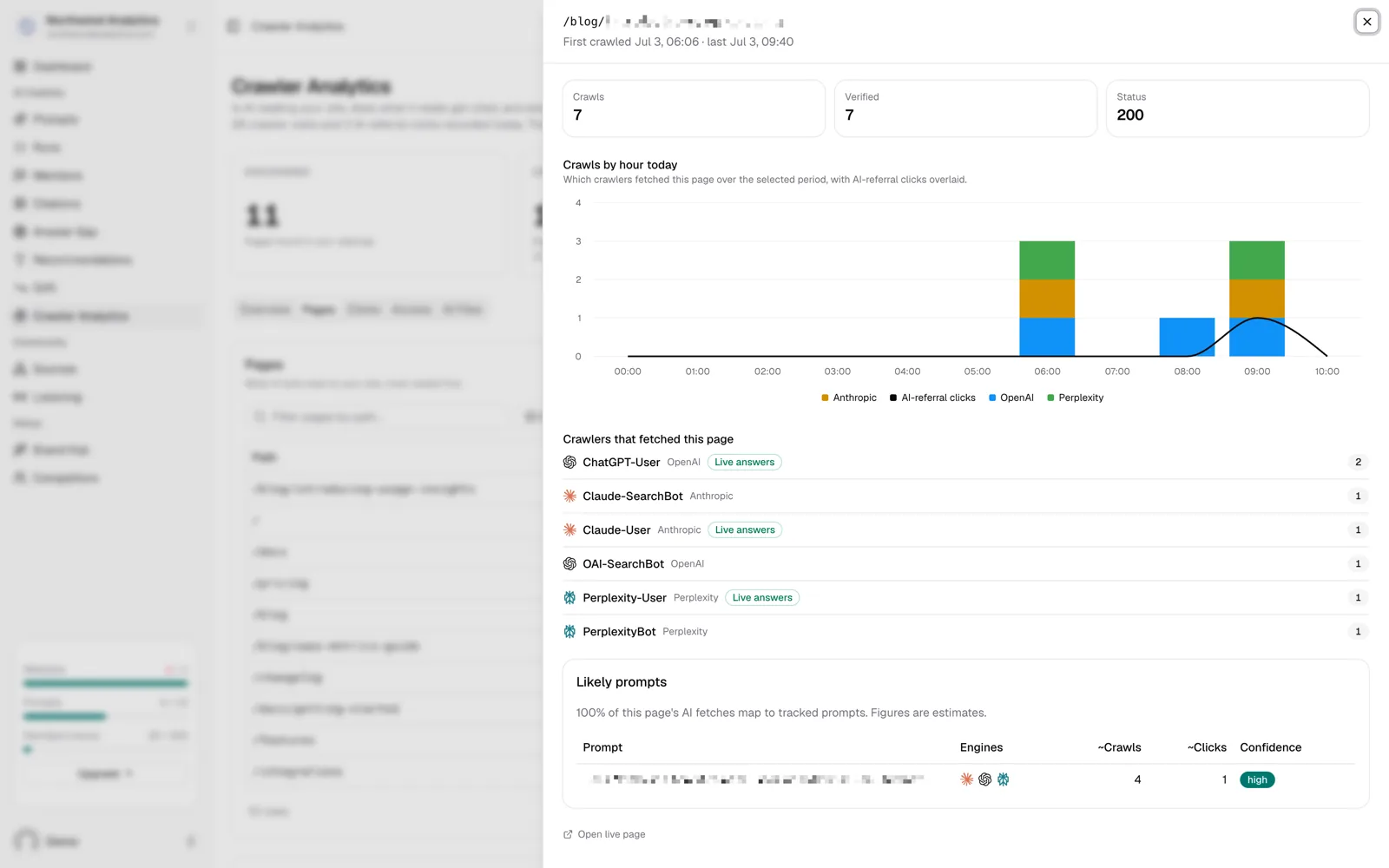
What a new page's first day looks like in MentionScout: on-demand fetches within minutes, index crawlers a few hours behind.
Why AI crawling is this fast
The speed stops being surprising once you know that "AI crawler traffic" is really three different kinds of traffic, usually from three different user agents per provider.
Live answer fetches. ChatGPT-User, Claude-User, Perplexity-User and their peers fetch pages at the moment a user asks something. There is no index in the loop at all. If an assistant decides your URL is worth reading, it reads it right now, while the person waits. This is the path that took six minutes, and the only real limit on it is whether the assistant has a reason to visit your page.
Search index crawlers. OAI-SearchBot, PerplexityBot, Claude-SearchBot and similar bots build the indexes behind AI search features. They behave more like the classic crawlers we grew up with, except the cycle is hours rather than days.
Training crawlers. GPTBot, ClaudeBot and friends collect content for training future models. This is the slow lane. Visits can take days or weeks, and what they collect only shows up in model behavior much later, if at all.
The distinction gets very practical the moment you open robots.txt. Each class identifies itself separately, so blocking one does not block the others. A lot of sites decided in 2023 to block AI training crawlers, wrote one rule that catches everything, and have been invisible to live AI answers ever since without noticing. If AI visibility matters to you, audit exactly which of the three classes your robots.txt turns away. We keep a complete list of AI crawler user agents, grouped by what each bot does, for exactly that audit.
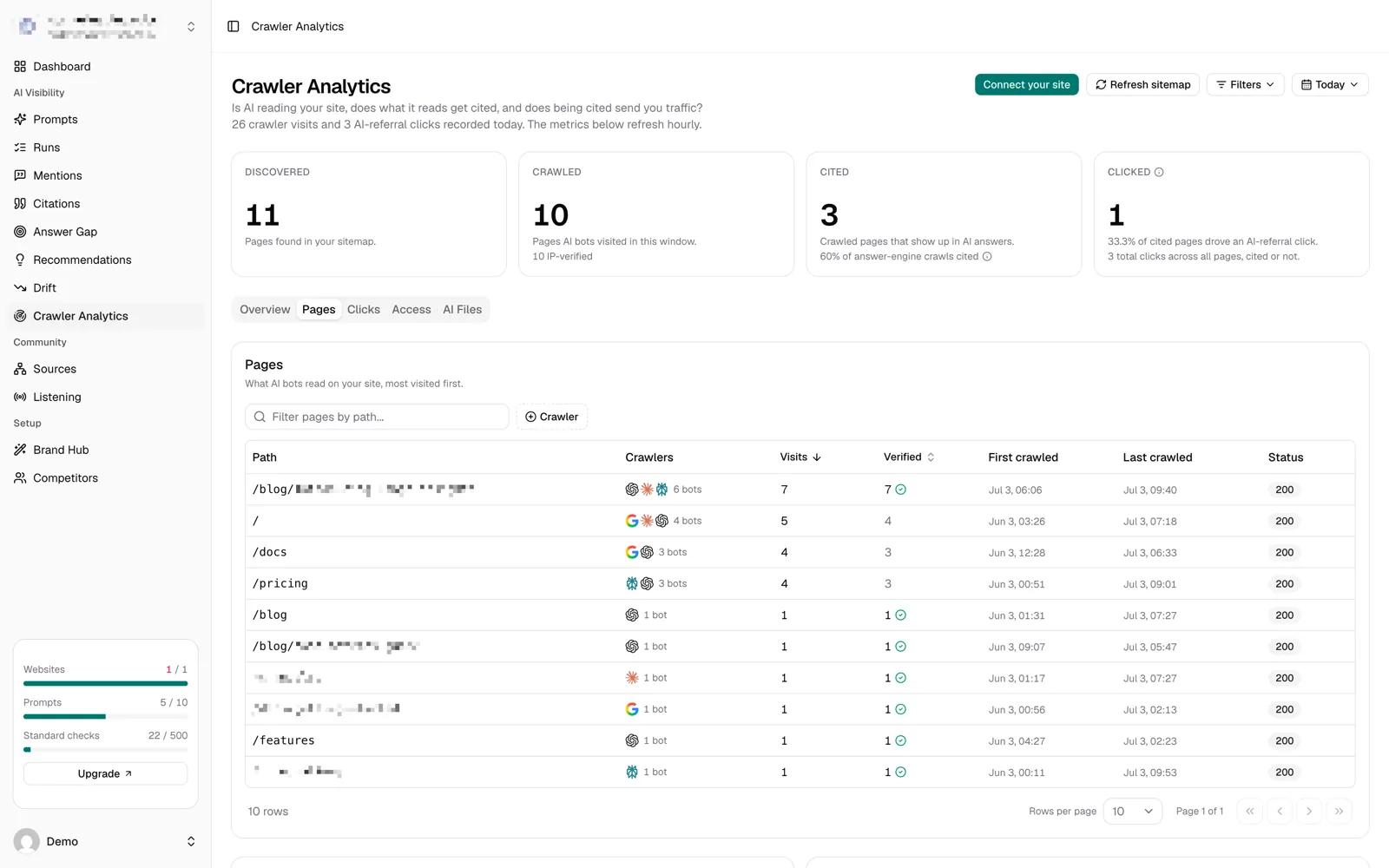
MentionScout splits crawler hits by purpose, so you can see live answer fetches, index crawls and training visits separately for every page.
How to get your pages crawled faster by AI engines
A few things clearly helped this test land in minutes instead of days, and they are all reproducible:
The page lived on an established domain. AI search indexes already knew the site, so the new URL had somewhere to be discovered from. A brand new domain with no history will not see index crawlers this quickly, though the on-demand path can still reach it the moment an assistant gets a direct reason to (a pasted link, a specific question, a mention somewhere it reads).
Nothing was blocking the bots. Sounds obvious, but based on the robots.txt files I have looked at since, it is not. Check yours before anything else.
The page answered a question directly. An on-demand fetcher grabs your page, skims it and quotes what it needs within seconds. A clear heading that matches the question, and an answer in the first paragraph under it, gets used. Pages that make the reader work for the answer get skipped, and an AI assistant is the least patient reader you will ever have.
The content was in the HTML. On-demand fetchers do not reliably wait around for JavaScript to render. Server-rendered content gets read; a client-side app shell often reads as an empty page. If your content only exists after hydration, you are invisible on the fastest path.
Internal links and a sitemap still matter for the index crawlers. The live-answer path does not need them, but OAI-SearchBot and friends found the page through normal site structure.
What this changes for publishing
The thing I keep coming back to: there is no waiting period anymore. If a user's question leads an assistant to your new page, that page can be quoted in an answer within minutes of going live. Same for fixes. On the live-answer path the assistant reads the page as it exists right now, so correcting an outdated claim counts from the very next fetch.
It also changes what "fresh content" means. Google rewarded freshness through an index that eventually noticed. AI assistants skip the middleman: the current state of your page is what gets read, every time someone asks.
And a crawl is only step one. The page then has to show up as a citation in answers, and eventually as referral clicks from the assistants themselves. Both are worth tracking, because that is where this traffic actually pays off. Our test page collected its first chatgpt.com referral click the same afternoon it was published.
The odd footnote: assistants also invent URLs
One more thing jumps out when you watch AI traffic at this level: assistants regularly request URLs that have never existed. They guess paths like /demo or /contact because most sites have them, and every wrong guess lands as a 404. Each of those is a user who asked about you and got nothing back. We will publish a separate post on that pattern, with real numbers from one of our own sites, because the fix turned out to be cheap and surprisingly effective.
Run the same test on your site
You can reproduce this in an afternoon:
- Publish a genuinely new page with a specific, answerable piece of information on it.
- Ask ChatGPT, Claude and Perplexity a question that only that page answers. Include enough context that the assistant searches rather than answering from memory.
- Watch your server logs for the user agents above, or point MentionScout's crawler analytics at your site and see every fetch on a timeline, verified and split by purpose, without grepping a single log file.
Before any of that, it is worth a two-minute sanity check that AI engines can see your site at all. The free AI visibility checker tells you whether ChatGPT, Perplexity and Google AI name your brand, and whether your site is readable to their crawlers. No signup.
Six minutes is the new gap between publishing something and an AI reading it. Whether your content shows up in AI answers is no longer a question of if it gets found. It gets found. The question worth losing sleep over is what the assistants say about you once they have read it.