

Mention vs citation
These two are easy to confuse, so it helps to be precise.- A mention is your brand, a competitor, or your domain being named in the text of an AI answer. It is about being talked about.
- A citation is your domain being linked as a source the answer drew from. It is about being credited.
Citations
See where your domain is linked as a source behind AI answers.
Where mentions come from
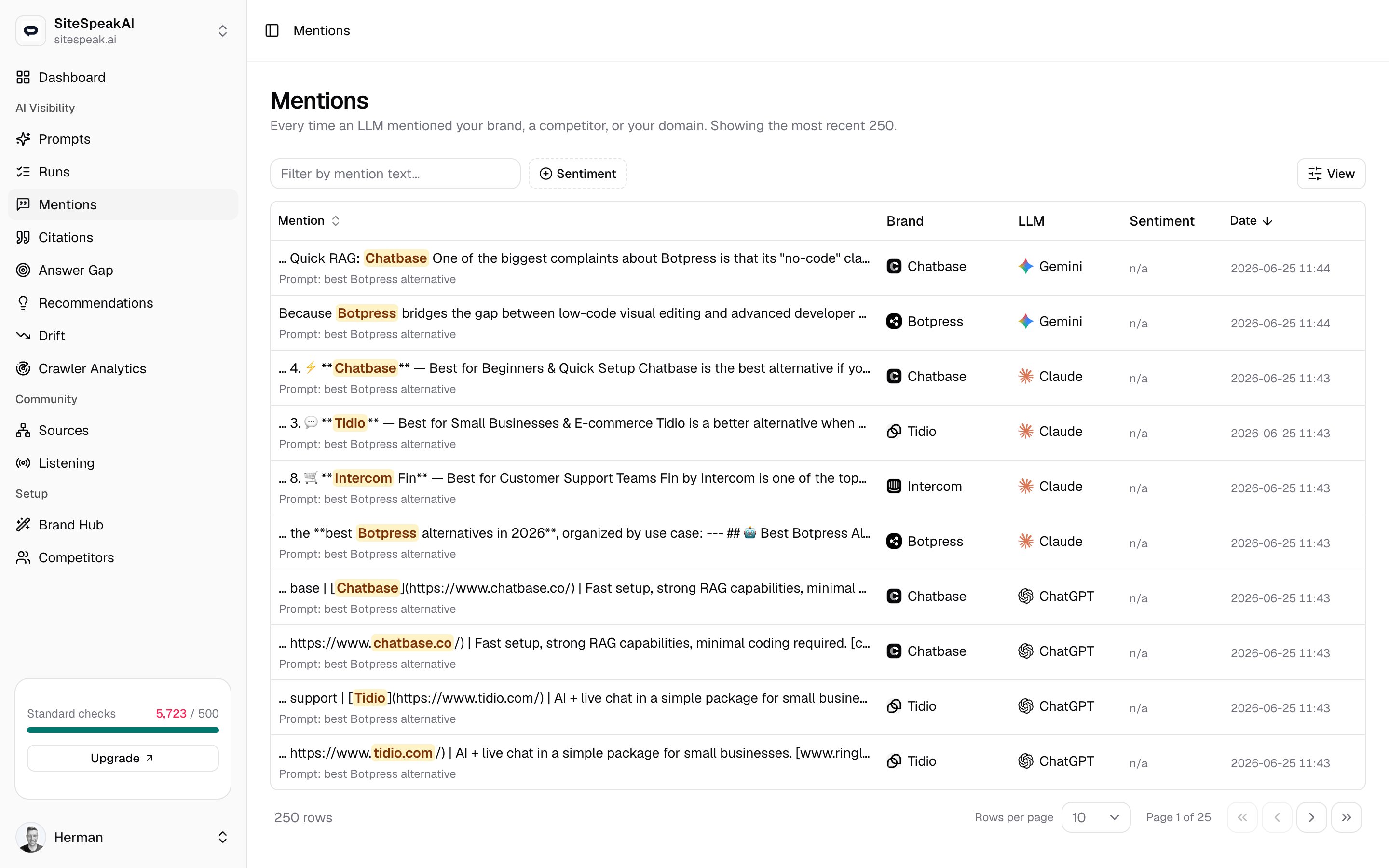
Every mention is extracted from a completed run. When MentionScout runs one of your tracked prompts against an AI answer engine, it reads the answer and records each time your brand, a competitor, or your domain appears. Click the mention excerpt to open the exact run it came from and read the full answer in context.What each column shows
Mention
Mention
An excerpt of the answer with the matched name highlighted in place, so you can read how it was phrased at a glance. Your own brand is highlighted in violet and a competitor in amber. The tracked prompt that produced the answer appears underneath as
Prompt: .... Click the excerpt to open the full run.Brand
Brand
Who was named. Either Your brand or the competitor’s name, each shown with its logo so you can scan the feed quickly.
LLM
LLM
The AI answer engine the mention came from, such as ChatGPT, Claude, Gemini, Perplexity, AI Overviews, or AI Mode, shown with its logo.
Sentiment
Sentiment
How the mention reads in context:
Positive, Neutral, or Negative. A muted n/a means sentiment was not scored for that mention.Date
Date
When the mention was detected, down to the minute.
Filter and sort the feed
The toolbar above the table lets you narrow the feed to what you care about.Search the text
Type in the Filter by mention text box to keep only mentions whose excerpt contains your words.
Filter by sentiment
Open the Sentiment filter and pick any combination of Positive, Neutral, and Negative to focus on how you are being framed.
Sort by recency
Click the Mention or Date column header to sort. The feed opens sorted by date, newest first.
Negative or neutral mentions are where the work is. They show where an AI answer frames you weakly or omits you while naming a competitor, which is exactly the kind of gap worth closing.
Related
Runs
Open the full answer behind any mention, including every engine and prompt run.
Citations
Track where your domain is credited as a source, not just named.
Concepts
How prompts, runs, mentions, and citations fit together.