

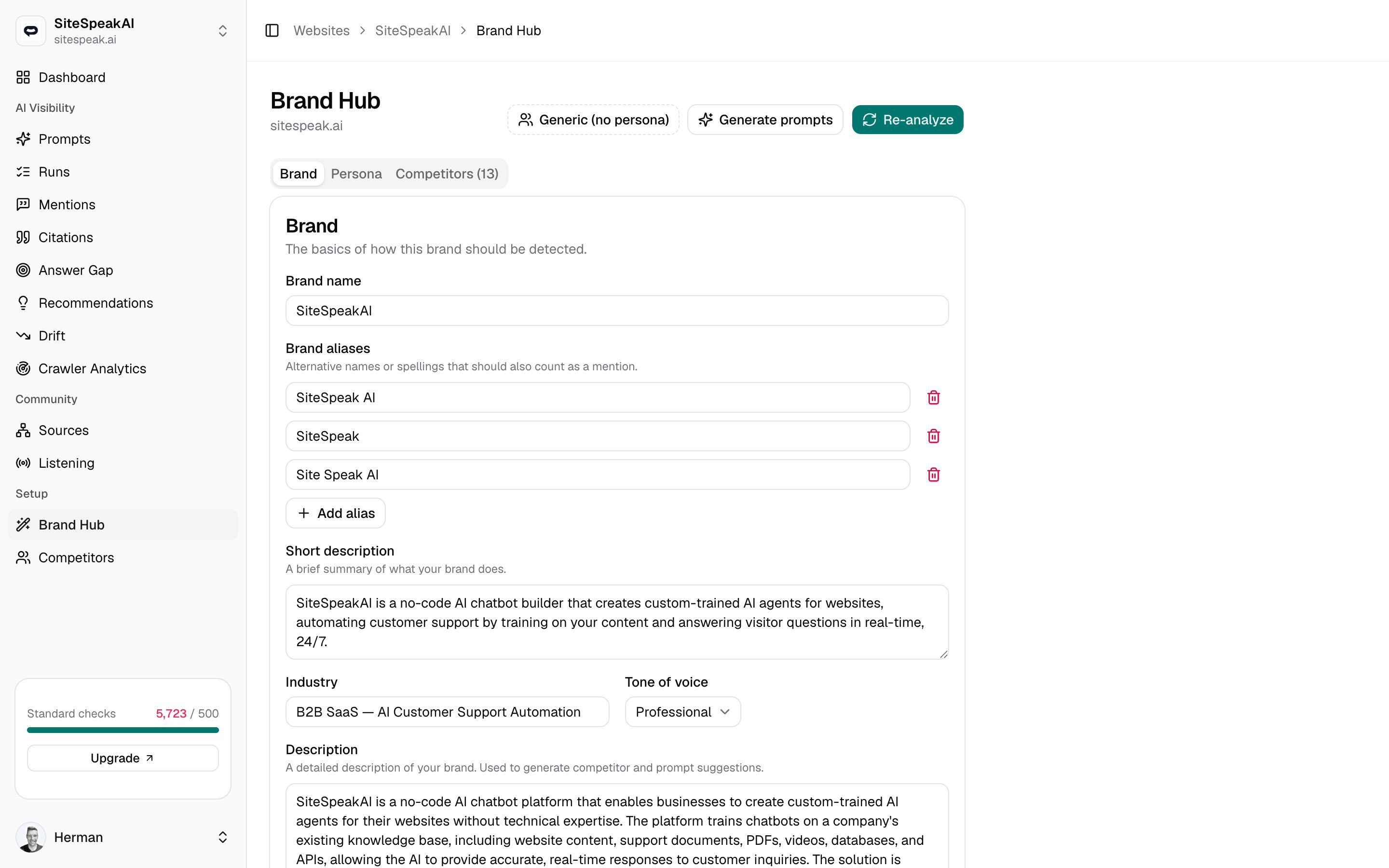
Opening Brand Hub
Brand Hub lives at/websites/{id}/brand, under Setup in the sidebar. The page header shows your domain, and three tabs organize everything:
Brand
The core profile: name, aliases, description, industry, and tone.
Persona
The audience you sell to, used to shape prompt suggestions.
Competitors
The brands tracked alongside yours for relative visibility.
MentionScout fills in most of this for you when you first add a brand. Brand Hub is where you review and refine it later.
Brand tab
The Brand tab holds the basics of how your brand should be detected. Edit any field, then click Save changes.| Field | What it does |
|---|---|
| Brand name | Your primary name. Required. |
| Brand aliases | Alternative names or spellings that should also count as a mention. Add one per row. |
| Short description | A brief summary of what your brand does. |
| Industry | Your category, for example B2B SaaS for AI customer support. |
| Tone of voice | Pick one of Persuasive, Professional, Friendly, Authoritative, Casual, or Informative. |
| Description | A detailed description of your brand. Used to generate competitor and prompt suggestions. |
| Key features | At least three specific features of your product or service, one per row. |
Persona tab
A persona describes your ideal customer. MentionScout uses it to sharpen prompt suggestions, so the prompts it drafts sound like the questions your real audience would ask an AI. The Persona tab has these fields:- Name: a short label for the audience, for example
Customer Support Manager. - Description: who they are, what they care about, and the problems they are trying to solve.
- Age range: for example
25-45. - Education level: for example
University degree.
Competitors tab
The Competitors tab lists the brands MentionScout also detects in AI answers, so you can see your visibility relative to theirs. The tab label shows the current count. From here you can click Suggest more to have MentionScout propose competitors, or Add competitor to enter one manually with a name, optional domain, and optional aliases. This is the same competitor list you manage on its own page.Competitors
See the full guide to suggesting, adding, and curating competitors.
Re-analyze your site
Click Re-analyze in the header to have MentionScout read your website again and rebuild the brand profile. A progress dialog appears while it works and usually finishes in 30 to 60 seconds. If an analysis fails, Brand Hub shows a banner explaining what went wrong. You can click Re-analyze to try again. The page also notes when your brand was last analyzed at the bottom.Generate prompts
Click Generate prompts in the header to draft a fresh batch of prompt suggestions from your current brand profile. New, non-duplicate prompts are added to your prompt list and enabled for every AI answer engine your workspace has connected. Because prompt suggestions are built from the Brand and Persona tabs, save your edits there first, then generate. Review and run the new prompts from the Prompts page.Prompts
Review, edit, and run the prompts MentionScout tracks for you.
Quickstart
The end-to-end flow from a new brand to your first results.