

The core model
Four things connect in a chain. Everything in the app is a view on one of them.Prompts
A prompt is a question you want to track, like
best CRM for small teams. It is the real wording your buyers type into AI. You keep a list of prompts per brand.Runs
A run is one prompt answered by one model at one point in time. MentionScout sends each prompt to the answer engines you picked (ChatGPT, Claude, Gemini, Perplexity, Grok, AI Overviews, AI Mode) on a schedule, and stores the full answer.
Prompts run on a schedule
Each prompt has a frequency ofdaily, weekly, or monthly, and MentionScout schedules the next run accordingly. You can also run any prompt on demand and see results within a minute or two.
Prompts have a type that shapes how they are read:
| Prompt type | What it captures |
|---|---|
| Organic | Category questions where you hope to appear (no brand named). |
| Competitor | Comparison questions that pit brands against each other. |
| Brand specific | Questions that name your brand directly. |
Brand-specific prompts stay tracked, but they are left out of your headline visibility score so they do not inflate it. A question that already names your brand is not a fair test of whether AI surfaces you on its own.
Prompts
Build and schedule the questions MentionScout watches for you.
Mentions vs citations
This is the distinction the whole product hinges on, so it is worth being precise.Mention
Your brand name appears in the answer text. The model talked about you. A mention carries the surrounding context and a sentiment (positive, neutral, or negative).
Citation
A URL is listed as a source the answer drew on. When that URL is one of your own pages, it counts as a citation of your domain.
- Mention, no citation: the answer says good things about you but links someone else’s page as the source.
- Citation, no mention: the answer links one of your pages but never names your brand in the prose.
- Both: the answer names you and cites your page. This is the strongest result.
- Neither: you did not show up in that answer at all.
Mentions
Every time a model named your brand, with context and sentiment.
Citations
Every URL models cited, including which of your own pages they linked.
How the app is organized
The sidebar groups features into three ideas. Knowing the mental model makes the navigation obvious.AI Visibility: your standing inside AI answers
AI Visibility: your standing inside AI answers
The answer pipeline plus the crawl-to-click funnel. This is Prompts, Runs, Mentions, Citations, Answer Gap, and Crawler Analytics. Start here to see whether AI surfaces you and what it says.
Community: the wider web that feeds AI
Community: the wider web that feeds AI
AI answers are built from public conversation. Sources and Listening track where your category is discussed on Reddit, Hacker News, and Bluesky, including which of those threads AI then cites.
Setup: your brand configuration
Setup: your brand configuration
Brand Hub and Competitors define who you are and who you measure against. Everything else compares your numbers to the competitors you list here.
The Visibility overview
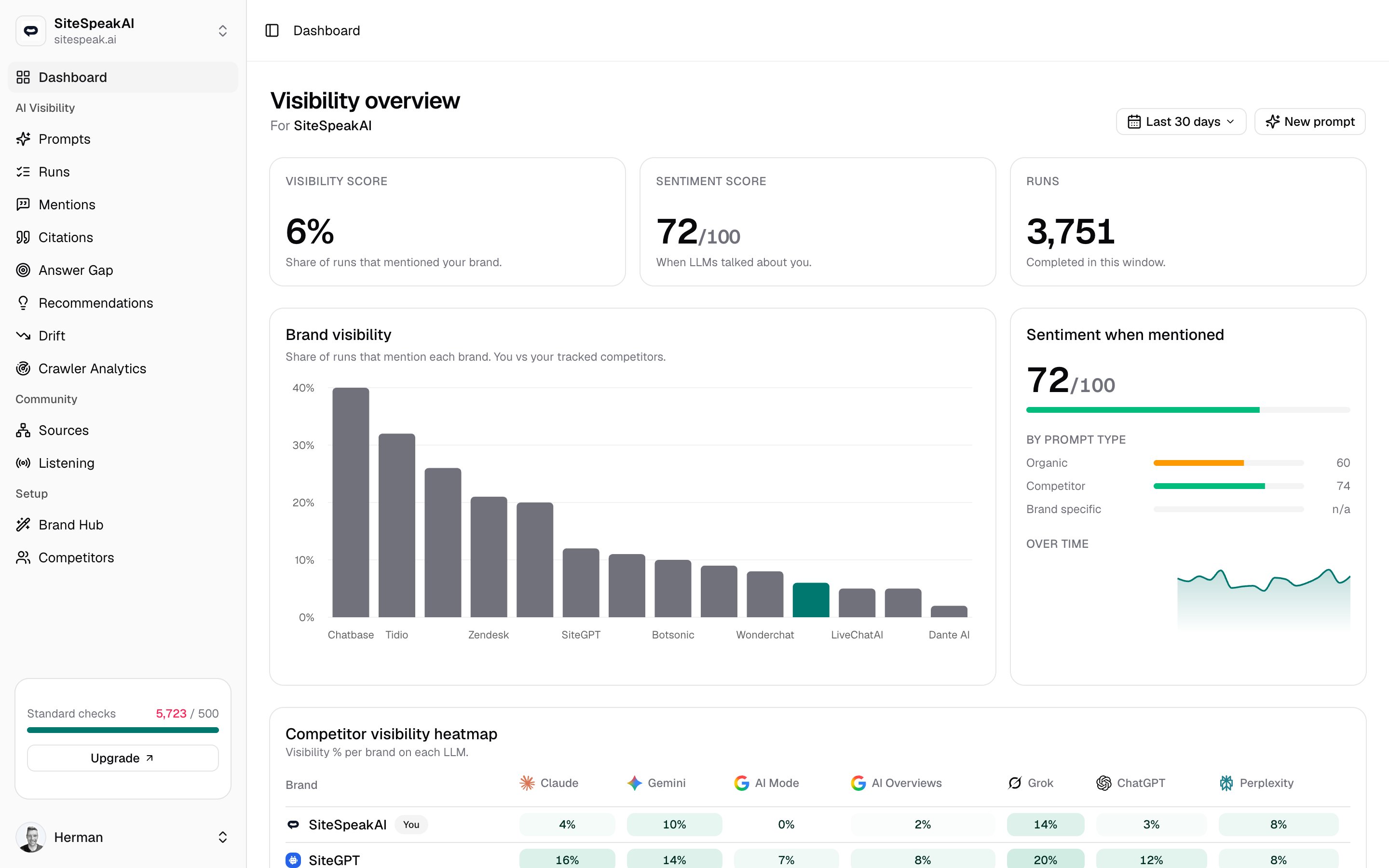
The dashboard rolls all of this up for the brand and time window you pick. Use the range control at the top right to switch between the last 7, 30, or 90 days. The three headline numbers at the top are:- Visibility score: the share of completed runs that mentioned your brand, as a percentage.
- Sentiment score: how positive the model was when it did mention you, on a 0 to 100 scale. It reads
n/auntil you have at least one mention. - Runs: how many runs completed in the window.
- Brand visibility charts your share of runs against each competitor you track.
- Sentiment when mentioned splits sentiment by prompt type and trends it over time.
- Competitor visibility heatmap shows visibility percent for you and each competitor on every model, side by side, so you can spot the engines where a rival outranks you.
- Visibility over time trends your daily share of mentioning runs.
- Top cited domains and Top ranked URLs list the sources models lean on, and which of your own pages get cited.
- Recent mentions and Recent social mentions surface the latest hits from AI answers and from the community.
The crawl-to-click funnel
Mentions and citations tell you what AI says. The funnel tells you what happens around it: AI crawlers fetch your pages, models cite some of them in answers, and readers click through to your site. The Crawler activity card on the dashboard summarizes the last 30 days as two numbers:- AI crawls: how often AI assistants fetched your pages.
- AI-referral clicks: how many visits those AI answers sent back to you.
Crawler Analytics
See which AI assistants crawl your site and the clicks they send back.